Claude Skills: Tips, Tricks, and the Practical Playbook
If you've spent any time re-explaining the same formatting rules, the same brand voice, or the same "no, do it this way" correction to Claude at the start of every conversation, Skills are the fix. They're Anthropic's answer to a simple problem: general-purpose agents are great at everything and expert at nothing, until you teach them once and let that knowledge persist.
This guide covers what Skills actually are, how the underlying mechanism works, and the tips that separate a Skill Claude reliably uses from one that quietly sits unused.
What a Skill actually is
A Skill is a folder. At minimum, that folder contains one file — SKILL.md — with YAML frontmatter (name and description) followed by Markdown instructions. Nothing more is required to get started, but a Skill can also bundle reference docs, executable scripts, and templates alongside that core file.
Anthropic ships four pre-built Skills that most people meet first: PowerPoint (pptx), Excel (xlsx), Word (docx), and PDF. These are already working behind the scenes on claude.ai and the API whenever you ask Claude to create or edit that kind of document — no setup required. Custom Skills are the same mechanism turned toward your own workflows: your team's report format, your commit message style, your compliance checklist, your brand guidelines.
The useful mental model is comparative. A Skill isn't a prompt, and it isn't quite a project:
- Prompts are one-off, conversation-level instructions you re-type every time.
- Skills load on demand and persist — write the workflow once, Claude reuses it whenever it's relevant, across conversations.
- MCP connects Claude to external tools and live data. Skills add the procedural know-how for using those tools well — the two pair naturally rather than compete.
The trick that makes Skills scale: progressive disclosure
This is the single most important thing to understand, because it explains almost every authoring decision later in this article.
Claude doesn't load every Skill's full contents into context at once. Instead, it works in three stages:
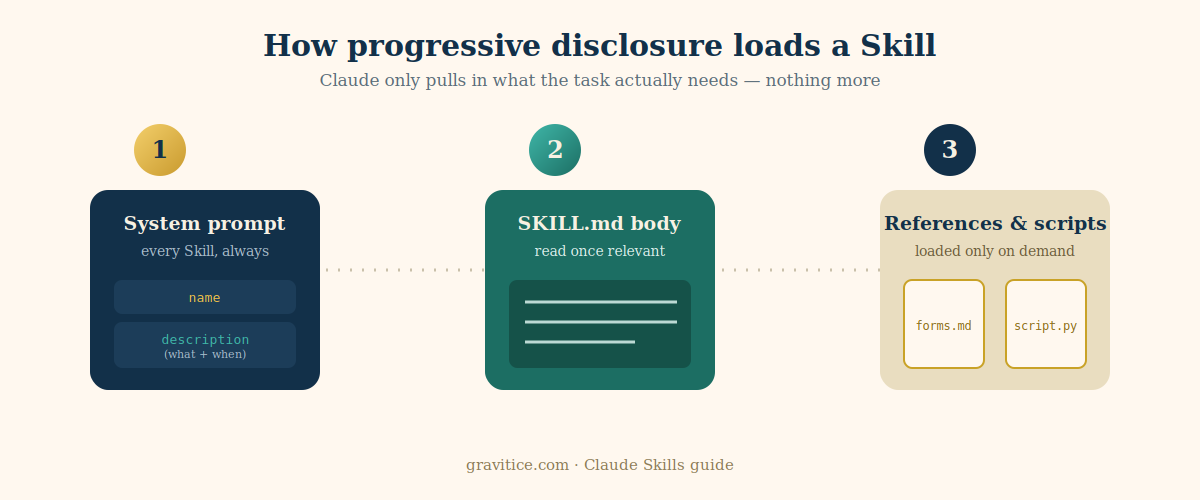
- System prompt (always loaded). Just the
nameanddescriptionof every installed Skill — nothing else. This is the only thing competing for space with the rest of your conversation before a Skill is even relevant. - SKILL.md body (loaded when relevant). If Claude judges the task matches a Skill's description, it reads the full file via a normal file-read.
- References and scripts (loaded only on demand). Additional bundled files —
forms.md, a style guide, a validation script — are pulled in only if the instructions in SKILL.md point Claude to them for the specific task at hand.
The practical consequence: a Skill can bundle dozens of reference files and comprehensive documentation without any context penalty, because unused files simply sit on disk consuming zero tokens. The only thing that's "expensive" for every conversation, all the time, is the description.
Tips for using the pre-built Skills well
- Just ask normally. You don't need to say "use the PDF skill." Claude selects Skills the same way it selects any tool — based on what your request actually needs.
- Be specific about the deliverable, not the mechanism. "Turn this into a slide deck with a title slide and three content slides" triggers pptx more reliably than a vague "make this nicer."
- Know the environment differences. On the API, Skills run with no network access and no runtime package installation — only pre-installed packages are available. On claude.ai, the code execution environment can install packages from npm and PyPI. If a Skill needs something unusual, check availability before assuming it'll work everywhere.
- Custom Skills don't sync across surfaces. A Skill uploaded to claude.ai isn't automatically available through the API — you upload separately to each surface you use.
Tips for writing your own Skills
1. The description is doing almost all the work
Claude picks which Skill to use — out of potentially dozens installed — based on the description alone, before anything else loads. A weak description is the single most common reason a Skill silently never fires. The pattern that works:
- State what the Skill does and when to use it, in the same sentence.
- Write in third person, consistently. "Processes Excel files and generates reports" — not "I can help you..." or "You can use this to...". The description gets injected into the system prompt, and an inconsistent point of view causes discovery problems.
- Don't be shy about triggers. Anthropic's own skill-creator guidance leans toward descriptions that are a little assertive about when to fire — spelling out specific keywords, phrases, and contexts a user might mention, even loosely, rather than a single narrow trigger phrase.
A description like "Extract text and tables from PDF files, fill forms, merge documents. Use when working with PDF files or when the user mentions PDFs, forms, or document extraction" does more work than "Helps with PDFs."
2. Explain the why, not just the rule
It's tempting to write instructions as a wall of ALWAYS / NEVER / MUST in capital letters. It reads like a rulebook, but it's brittle — Claude follows the letter of it and can misapply it in edge cases the rule didn't anticipate. Explaining the reasoning behind a rule gives Claude something to generalize from:
"Use constructor injection — field injection breaks testability because the field can't be mocked without a Spring context" works better than "MUST use constructor injection. NEVER use field injection."
Reserve the all-caps imperative for the genuinely fragile, no-judgment-call steps where a bare rule really is correct.
3. Structure for scale — keep SKILL.md as the table of contents
Once SKILL.md starts feeling long, that's the signal to split it. Move detailed material into separate reference files and link to them by name — SKILL.md should read like a table of contents pointing to chapters, not the whole book. Keep it under roughly 500 lines; if a reference file itself runs past 100 lines, give that file its own contents section at the top so Claude can jump straight to the relevant part.
If two contexts are mutually exclusive — form-filling instructions versus general PDF reading, say — keep them in separate files entirely. That way a task that never touches forms never pays the token cost of reading form-filling instructions.
4. Make scripts do the deterministic work
For anything deterministic, frequently repeated, and worth testing independently — a validator, a formatter, a schema check — write it as an executable script rather than instructions for Claude to reproduce in its head each time. Scripts run via bash, and only their output enters context, not their code. That's both cheaper and more reliable than asking Claude to regenerate equivalent logic from scratch on every run.
One implementation detail worth stealing: make validation scripts verbose. An error like Field 'signature_date' not found. Available fields: customer_name, order_total, signature_date_signed lets Claude self-correct in one step, instead of guessing.
5. Test it the way it'll actually be used
The most effective iteration loop Anthropic describes is a two-Claude pattern: one instance (call it the author) writes and refines the Skill; a separate instance actually uses it on real tasks. Watch the user instance for:
- Unexpected exploration paths — reading files in an order you didn't anticipate, which usually means your structure isn't as intuitive as it felt while writing it.
- Missed references — if Claude never follows a link to an important file, that link probably needs to be more explicit or higher up in SKILL.md.
- Overreliance on one section — if the same file gets re-read constantly, that content probably belongs in the main SKILL.md instead of a reference.
Bring those observations back to the authoring instance and revise. Iterating on observed behavior beats iterating on assumptions about how a Skill "should" be used.
Security: treat Skills like installing software
This is worth its own section because it's easy to skip. A Skill can direct Claude to run bash commands, read and write files, and call external tools — which means a malicious or careless Skill can do real damage, especially with access to sensitive data.
The working rules:
- Only use Skills from trusted sources — ones you wrote yourself or that come from Anthropic. If you must use a third-party Skill, audit it first: read every bundled file, not just SKILL.md.
- Watch for adversarial instructions — anything that tells Claude to ignore safety rules, hide actions from the user, or exfiltrate data through its own responses.
- Check for network calls and hardcoded credentials in any bundled scripts. Credentials belong in environment variables or a secrets store, never in skill content.
- Be extra careful in production systems with access to sensitive data or critical operations—the same skill that's harmless in a sandbox is a real risk with write access to a live system.
Where Skills actually run
Skills aren't a single-surface feature. Pre-built document Skills are available on claude.ai, the Claude API, the Claude Platform on AWS, and Microsoft Foundry (the last requires a hosted-on-Anthropic deployment there). Custom skills can be authored in Claude Code, uploaded through the Claude API, or added directly in Claude.ai settings, with the Skills API covering AWS and Foundry deployments. In Claude Code specifically, skills live as directories under .claude/skills/ (project-level, shared via Git) or ~/.claude/skills/ (personal, across all your projects) and are auto-discovered at startup.
One retention note if you're weighing this for anything regulated: Agent Skills is not currently covered by Zero Data Retention arrangements—skill definitions and execution data follow Anthropic's standard retention policy.
Quick reference
| Want to... | Do this |
|---|---|
| Get Claude to use an existing Skill | Just describe the deliverable — no need to name the Skill |
| Stop a Skill from silently not firing | Rewrite the description: what it does + when to use it, third person, specific triggers |
| Keep a big Skill fast and cheap | Split into SKILL.md + reference files; link, don't inline everything |
| Make a repeated check reliable | Write it as a script, not as instructions to "remember" |
| Avoid brittle edge-case failures | Explain why a rule exists instead of just stating it in caps |
| Vet a third-party Skill | Read every bundled file; check for network calls, hardcoded secrets, hidden instructions |
Skills are, at their core, a very old idea wearing new clothes: write the procedure down once, well, and stop repeating yourself. The mechanics of progressive disclosure are what make that scale—but the actual leverage still comes from the same place it always has: a clear description of what something does and a clearly reasoned explanation of how to do it.